Real maps → worlds · one-tap hosting

Turn real places into playable Minecraft worlds

TopoBlocks turns real cities, neighborhoods and natural landscapes into importable .mcworld files, then deploys your world to your own server in one tap—from a single map to playing online with friends, all on your phone.

Diagnose before you paySee the quality score, a free 3D preview and compatibility before anything is generated.
Never overwrites your originalsRepairs, conversions and deployments always produce a new version—your source files stay intact.
Verifiable at every stepStructure validation and a readable report confirm the result actually works.
TopoBlocks home page: turn real places into playable Minecraft worlds
1

Core capability · build worlds from real maps

Turn real maps into playable worlds

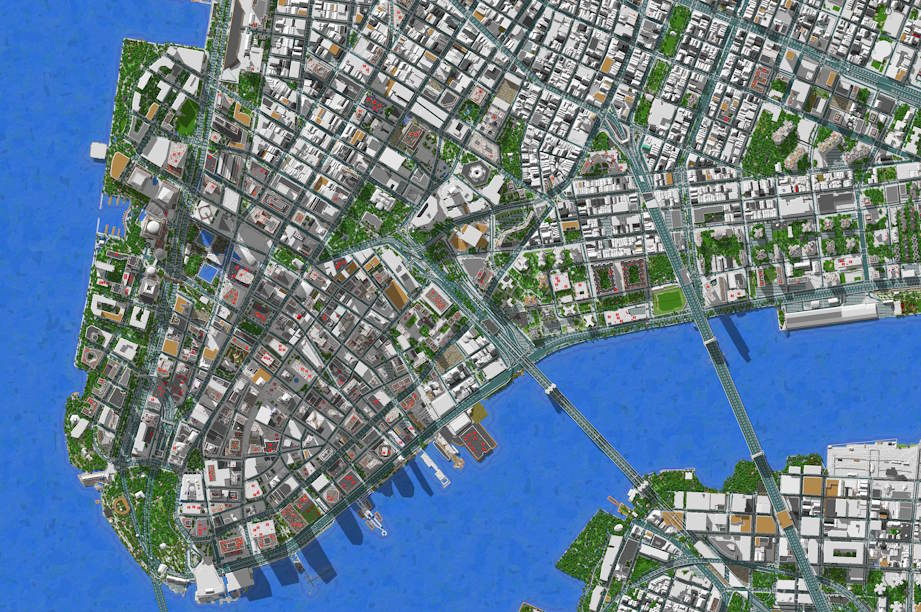
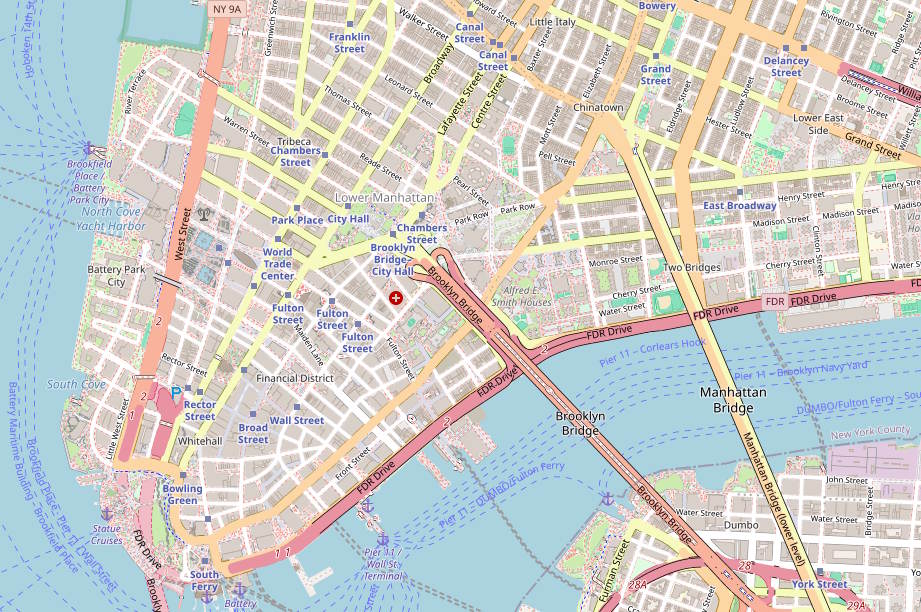
We read real OpenStreetMap data and open elevation to rebuild a city's buildings, roads, waterways and terrain into an importable world. Below is the real map of Lower Manhattan alongside the generated result—drag the slider and compare for yourself.

  • Real building footprints, roads, waterways and terrain elevation
  • View the free map quality score and a low-resolution 3D preview before generating
  • Survival / true-to-life recreation / exploration / treasure-hunt templates and multiple output formats
  • Import into Minecraft in one tap, or deploy safely straight to a server
Coming soonApp Store Read the tutorial
Top-down view of the Minecraft world generated from the same area
The real OpenStreetMap of Lower Manhattan
Real map Minecraft
Drag the slider to compare · real map ↔ Minecraft

Demo video · generating a Minecraft world from a real map

Server details and safe-deploy interface
2

Core capability · fast hosting

One tap, and your world goes live

No terminals, no port configuration. Pick an edition and a plan, and we provision and host your Minecraft server for you—the built-in steward on the machine pairs automatically and you're online in minutes. Deploy your generated world in one tap and invite your friends to play.

1

Pick an edition and plan

Choose Java Edition / Bedrock, the game version, plan and region; after your subscription is verified, provision in one tap.

2

Automatic server setup

We allocate → install → harden → go live for you, with real-time progress the whole way—no terminal required.

3

Get an address and play

Receive a dedicated connection address to copy or share; check the player count, memory, and start/stop the server.

4

Deploy your world safely

Deploy your generated world live in one tap: automatic snapshots, pre-launch validation, health checks and rollback on failure.

Coming soonApp Store Learn about safe deployment

See the results for yourself

See it clearly before you pay—readable evidence at every step

Everything below is a real in-app screen. Swipe left and right to see the full flow.

The full lifecycle · and then some

Everything to do with your worlds, in a single app

Beyond the two core capabilities, TopoBlocks also covers opening, diagnosing, repairing, cross-edition converting and protecting world files—one trustworthy home.

Create

Real maps → worlds

Search for a city, a street or a stretch of natural scenery, and generate an importable world sized by area. Quality and price are visible up front.

  • Search places by name, address, landmark or current location
  • Free map quality score + lightweight 3D preview
  • Priced by area, with a fixed price shown before you buy
  • Survival / true-to-life recreation / exploration / treasure-hunt templates
World OS

Open, repair and protect

Open any world file and get a free local diagnosis first; see the issues, risks and expected outcome, then decide whether to pay for processing.

  • Open .mcworld, ZIP and Java world files
  • Free local scan, health report and simple ZIP repair
  • Advanced repair, Java Edition → Bedrock conversion and slimming optimization
  • Snapshots, version history and "restore as a new copy"
Server

Monitor and deploy safely

Monitor your server for free; enable full management when you need it: snapshots, pre-launch checks, health checks and one-tap rollback.

  • Free status monitoring—no credentials required
  • Take remote snapshots and verify they're restorable
  • Safe deploy: snapshot → validate → atomic switch → health check
  • Automatic rollback on failure, with a complete operation log retained

Our bottom line—not marketing speak

Diagnose before you pay · never overwrite the source · verifiable results

You shouldn't pay for an unknown outcome. We tell you what we found, whether anything will be uploaded, how long it takes, and what happens if it fails.

Diagnose first

See the result before you see the price

See the quality score and a free 3D preview before generating; see compatibility before converting; see the snapshot and rollback policy before deploying. We never use the "pay first to find out whether it's even supported" trick.

Source files stay safe

A new version every single time

Repairs, conversions, optimizations, restores and deployments all produce a new file. Your original file—or the pre-deployment snapshot—is always recoverable. "Zero accidental overwrites" is our release red line.

Honest about limits

We don't promise "100% lossless"

We don't promise a perfect conversion. We give you a compatibility score and itemize the entities, blocks, behavior/resource packs or player data that may change, then validate the structure and hand you a readable report.

FAQ

On creating, repairing, converting and hosting

How does Real Map generation work?

Search for a real place by name, address, landmark or current location and choose the area. We read public map data (building footprints, roads, waterways, terrain) and generate a world you can import into Minecraft. The full flow is: search a place → choose the area and spawn point → choose a gameplay template and output format → review the free map quality report → view a free low-resolution 3D preview → see the final price and estimated time → purchase → generate in the cloud (with real-time progress) → structure validation → result report → save, open in Minecraft, or deploy to a server.

Why are the quality assessment and 3D preview free?

Because you shouldn't pay for an unknown outcome. Map data quality varies a lot from place to place, so before charging anything we show you building, road, waterway and terrain coverage and give a clear "good to generate / adjustments suggested / not recommended" verdict. The free low-resolution 3D preview lets you rotate, look top-down, and toggle layers and day/night. The quality score is an estimate of data coverage, not a guarantee of accuracy; the preview is low-resolution and not a block-for-block copy of the final result.

How is pricing decided?

Diagnosis is free; you only pay—based on the area, complexity and output format you choose—after you've confirmed the result, with an automatic refund on failure. The price confirmed at checkout doesn't change after purchase. Exact prices are shown on the in-app purchase page for your region—the in-app price is authoritative.

My world won't open—can it be fixed?

Usually, yes. A very common problem is a world wrapped in an extra folder, so Minecraft can't find level.dat at the root of the archive. This kind of simple structural repair is free and produces a new .mcworld. More complex corruption is handled per-job by "Advanced repair"; before you pay, we show you the specific issues, the probability of success, the expected output, the risks and the refund policy.

Will a repair change my original file?

No. A repair always produces a new output file; your original file stays unchanged along with its hash, so the result is fully traceable. "Zero accidental overwrites" is our release red line—it's our bottom line, not marketing speak.

Can I convert a Java world to Bedrock and play it on my iPhone?

Yes. Java Edition → Bedrock conversion outputs an importable .mcworld. Before you pay, we show you the compatibility score, what migrates intact (terrain, blocks, containers, structures), and what may need to be replaced.

Is the conversion 100% lossless?

No, and we never promise it is. Java Edition and Bedrock are different formats. Some Java-only entities, blocks, behavior packs, resource packs, redstone behaviors or player data may be replaced with compatible equivalents, or moved into a separate report rather than written into the world. We show you the compatibility score up front and, once finished, give you an item-by-item readable report of exactly what was replaced or changed—no surprises.

What's the difference between monitoring and full management?

"Monitoring only" is free and needs just the server address and port; it shows online status, version, player count and latency, and provides basic offline alerts for a single server. It doesn't read your world directory and has no write access. "Full management" (paid) requires you to explicitly authorize the connection method and world directory, adding remote snapshots, restorability verification, safe deployment, automatic health checks, one-tap rollback, resource-pack sync and an operation log. You can revoke authorization at any time.

What happens if a paid job fails?

A failed job is automatically refunded (or your credits are returned)—you never pay for a failed result. We keep the failure report and a retry option. A failed generation doesn't consume credits.

How do I manage or cancel a subscription?

All in-app digital features are billed through Apple StoreKit. Purchases can be restored across devices, and consumable credits don't expire for no reason. Subscriptions are managed in your Apple ID settings: "Settings → your name → Subscriptions" lets you cancel at any time, after which you keep access through the end of the current paid period.

Looking for the answer to a specific question? Head to the Learning Center, Guides or Help Center.

From a real map to playing online with friends

Diagnosis is free and, by default, happens on your device first. Download TopoBlocks, prove the result, then decide whether to pay.

Coming soonApp Store Read the Help Center

We're preparing the App Store listing—this is a placeholder entry for now and will be downloadable once it's live.

Get the app